Share:

Showing posts with label high ISO Milky Way Photography. Show all posts

Monday, May 23, 2016

View of the Milky Way with Your Naked Eye

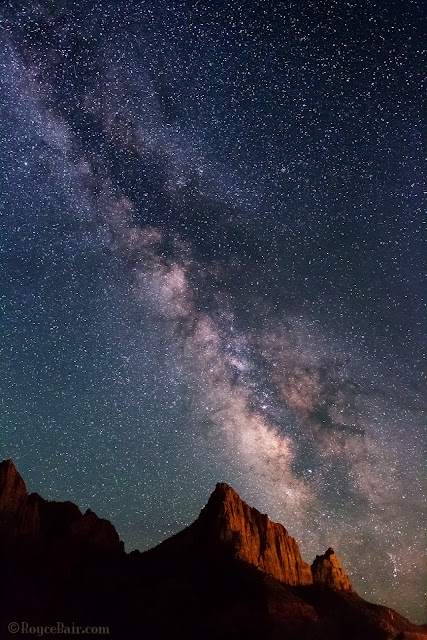
Milky Way over The Watchman - Zion National Park, Utah. Light on mountain is light pollution from nearby Springdale city street lights ~ © Royce Bair

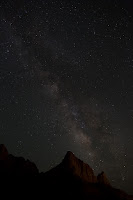
Simulated naked eye view
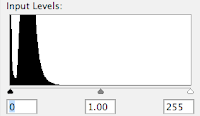
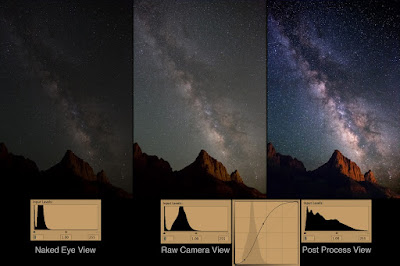
Histogram of a "naked eye" exposure
What the eye sees vs. what the camera sees. When people see my NightScapes for the first time the most common question is, "Is that what the Milky Way really looks like with your naked eye? Can you really see that many stars in the night sky?" The answer is, "Yes and no." You really can see it quite clearly with your naked eye (if you are in an area with very little light pollution), it's just not as bright as I can see with my camera.

The reason is because my camera is manually controlled to take the images at a longer exposure (typically 8 to 30 seconds, depending on the lens I'm using), so it gathers more light for its sensor than my eyes can. Also, the human eye has an iris aperture that is rated at about f/4.0, whereas my typical night photography lens is rated at f/2.8 or wider (letting in twice as much light to the sensor).
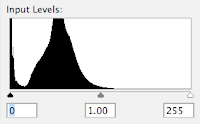
Histogram of raw camera exposure
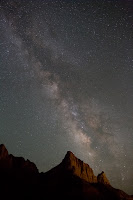
Raw camera exposure
Above, is a simulated view of what my eye saw of the Milky Way over The Watchman in Zion National Park — this is about two stops darker than what my camera recorded (to the right), using an f/2.8 aperture setting, an exposure time of 15 seconds, and an ISO of 6400 or 8000. (Notice that the "toe" of the exposure histogram is just passing the midway point, whereas the toe of the simulated "naked eye" exposure histogram doesn't even come close to the midway point. This exposure is two stops less than what it should be —post production corrections can correct a 1-stop underexposure, but not a 2-stop underexposure. This means that if you only have an f/3.5 or f/4.0 lens; or your camera only goes to ISO 3200, you're still going to get an acceptable exposure, that's within the range of post production correction —provided you shoot in the camera "raw" mode, which typically has 16-bits of information, rather than the camera JPEG mode which carries only 8-bits of information per color channel. Here's a tutorial I created on the benefits of 16-bits raw images vs. 8-bits images.)

Post Production: The raw camera image has all the brightness and detail needed for a great photo, but it is flat or lacking in contrast. My final NightScape images are created in post production with very simple steps in Photoshop. All the stars are there in the camera's raw image, but a contrast gain in the sky is necessary to make them more apparent. My goal is give the same clarity you expect to see in an astronomical observatory (taken with a huge telescope) image, but with a wide-field view, coupled with an interesting landscape feature in the foreground — something the big telescopes cannot do!
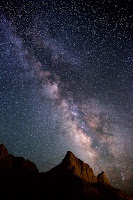
After adding curve adj.
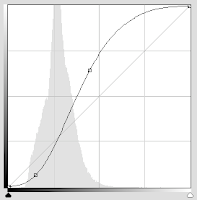
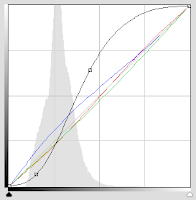
"S" shaped adjustment curve
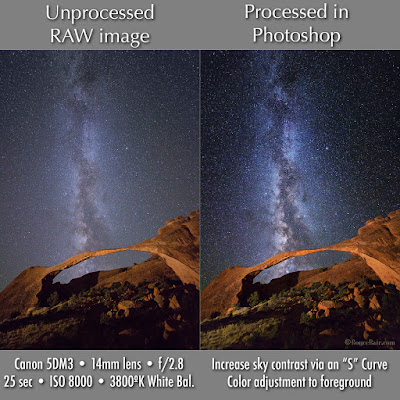
The powerful "S" Curve. Here's the main Photoshop post production step I use to increase the contrast in the sky: I first select the sky, using the Magic Wand tool (I usually have to do a little Laso tool work to get all the bright stars into the selection). I then create a channel of the selection that I can use later. The second and main step is to turn that saved selection into a "Curves" Adjustment Layer that I can add a contrast-increasing "S" shaped adjustment curve. (The shape of this curve is controlled by the two anchor points so that the curve pinches or brightens the large highlight area to the right of the histogram "mountain", and darkens the shadow area to its left.) The more vertical the line becomes between the two anchor points, the more your contrast gain.
Slight color changes via Curves
Sky Color Balance. Every evening sky has a difference color to it, depending on the atmospheric conditions for that night. Some photographers shoot in the "AWB" Auto White Balance mode, which produces somewhat of a neutral coloration to the sky. Some will use a daylight White Balance (about 5250º K), giving a much warmer tone to the sky. Others will use the "Tungsten" (or incandescent) setting (about 3200º K) for a deep blue look. Although all of these settings can later be adjusted in Adobe Photoshop's RAW Converter, I prefer to set my Kelvin to 3800º. This setting usually give me the most natural look to my night sky.

Final, minor color changes can be made in Photoshop's Curves to the the red, green, and blue channels (represented by the three diagonal colored lines). Be careful to not over do this — as a little color goes a long way. The final coloration depends on what you remember seeing in the sky that night.

Adjusting the landscape. The final step is to use the same saved sky selection (channel) and inverse it so that it is now selecting the mountains, instead of the sky. Once this is done, another Adjustment Layer (you can use "Levels", or "Curves", but Curves is more powerful) is created from that selection in order to change the color of the sodium vapor lights (coming about a mile away from Springdale city) —so that The Watchman mountain is a more pleasing "red rock" sandstone color.
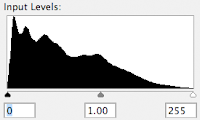
Histogram after all adjustments
Extended tonal range. The purpose of all these adjustments is to not only increase the contrast of the sky, but to extend the tonal range of the final image. Compare the histogram on the right to the histogram of the raw camera  exposure, above. Note: The "S" curve contrast adjustment naturally increases color saturation and vibrance. In most cases you will not have to artificially add more.

Compare: In the image below you can quickly compare the differences between the "naked eye" simulation, the "raw camera" exposure, the "S"-curve adjustment, and the final image —with the extended tonal range of its histogram.
Click to enlarge.
Here is another comparison of the camera RAW exposure vs. simple post processing via the "S" curve in a Photoshop "Curves" Adjustment Layer:
Click to enlarge
My eBook, Milky Way NightScapes, provides additional post processing instruction in its 4th chapter.


Thursday, July 10, 2014

The Edge Of Perception by Michael Shainblum

"The Edge of Perception" - an illustrative Milky Way photograph by Michael Shainblum (click to enlarge)
Michael Shainblum recently took our Photo of the Week at one of his favorite spots in California —along the Armour Ranch Road in Santa Ynez. Michael loves the rolling hills with the giant oak trees, as they make for awesome foregrounds with the Milky Way. The bright spots on the horizon are not the sun setting, but actually light pollution from Los Angeles county —proving that the distant glow from city lights can be a wonderfully illustrative tool in the right hands!

Technical Stuff: Michael used a Canon EOS 6D. The Milky Way was tracked for 60 seconds using a Vixen Polarie, and then brought into another 60 seconds land exposure, with the tracking off. This helps to produce and cleaner (lower noise) and sharper look. The post processing was made to retain all the true color spectrum of the Milky Way "without being too jarring or too contrasty".

Challenges: "It was annoying because [jet] contrails kept appearing in the sky and they were too big to be photoshopped out so I sat out there for an hour just to wait for the contrails to dissipate," says Michael.

Michael Shainblum
Satisfaction: "My main goal was to show a surreal, yet realistic scene. The name 'The Edge Of Perception' came from starring at the image on me screen blankly for an hour. I finally started thinking some of these images really do capture the unknown and the almost intangible. These Milky Way images really do fall on the edge of our perception and of our reality," reports Michael.

Michael Shainblum is from San Diego, California. He graduated from Brooks Institute of Photography in Santa Barbara, and now lives in San Francisco. More of Michael's work can be seen on his website. He also teaches workshops for photography and timelapse via Skype.


Royce's 2014 Workshop, Lecture & Video Conference Schedule: NightScapeEvents.com


Wednesday, June 11, 2014

Milky Way Landscapes by Denise Waterman

Milky Way with Bristlecone Pine in Bryce Canyon ~ © Denise Waterman
Nikon D600 with Nikkor 14-24mm @ 24mm • f/2.8 • 30 seconds • ISO 6400
Denise Waterman is being featured today because her Meetup.com peers voted her Moulton Barn and Bristlecone Pine photos into second and third place, respectively.

Milky Way over John Moulton Barn, Mormon Row, GTNP ~ © Denise Waterman
Nikon D600, Rokinon 24mm • f/1.4 • 15 seconds • ISO 6400 (click to enlarge)
Denise Waterman is a retired mechanical engineer and a mother of two grown daughters. She has had a lifetime love of both photography and astronomy and is excited to be learning a new way to combine the two hobbies with night photography.  The best part is being able to share the hobby with her husband Steve.

Denise and Steve also enjoy doing wildlife photography together. Owls are her favorite wildlife subject.

Royce's 2014 
Workshop, Lecture & Video Conference Schedule: NightScapeEvents.com

Friday, February 14, 2014

'The Mask' at Bryce Canyon by Steve Waterman

Milky Way stars over "The Mask" at Bryce Canyon National Park ~ © Steve Waterman
Steve Waterman took our Photo of the Day with a Nikon D800, using a Nikkor 14-24mm  f/2.8 lens (at 20mm) • f/2.8 • 30 sec • ISO 6400. "The Mask" is a sandstone formation on the Navajo Trail, in Bryce Canyon National Park. Steve was facing the northern end of the Milky Way in this picture (you can clearly see the Andromeda Galaxy in the middle-right of the sky).

This formation was light painted by your editor (using a diffused quartz halogen spotlight), during one of our August workshops, last year. "The Mask" is an unofficial name I gave this feature, after finding out the park service had no name for it. (Here's a sunrise version of this formation.)

Steve Waterman shares photography for fun and relaxation with his wife, Denise.  To support the photography hobby, he practices law, doing commercial litigation and reorganization with an international law firm.


Wednesday, November 13, 2013

Milky Way Over Zion's Lone Pine Tree

Milky Way over Zion National Park's most famous lone pine tree ~ © Robin Perkins
Canon 5D Mk III • Rokinon 14mm f/2.8 lens • f/2.8, 30 sec, ISO 6400
Robin Perkins
Robin Perkins photographed this famous lone tree last week, in Zion National Park, after the rest of our workshop group had left for their warm hotel rooms. Phill Monson, C.Y. Roby, and I did the light painting with a couple of Roby's Calumet LED Light Panels, and Phill's Brinkmann Dual Xenon spotlight. Although Phill and I both photographed the this scene, Robin's lower perspective peaked my interest.

Robin was born and raised in the Salt Lake City area, where he played varsity football at Cyprus High School and was a Sterling Scholar in industrial arts. He attended Weber State College and the University of Utah. He worked in the electrical construction industry for 36 years as a project engineer and electrician. Robin was able to retire last year at 62 and and start on one of his retirement goals to become a better photographer. He and his wife, Penny, have two sons, Shane and Travis.


Royce's 2014 Workshop, Lecture & Video Conference Schedule: NightScapeEvents.com
Featured Post: Shooting Stars eBook Review — How to Photograph the Stars and the Moon

Wednesday, July 31, 2013

Heaven's Gate

Milky Way through a gated fence at Triangle-X Ranch, Grand Teton N.P. ~ © Royce Bair
This is one of the "NightScapes" I orchestrated for our Grand Teton workshop group three weeks ago. It's the Milky Way through a gated fence at Triangle-X Ranch, Grand Teton National Park. I think it a wonderful symbol of the Old West and our cowboy heritage. The fence and gate were lit with a Coleman-style lantern placed about 75 feet (23 m.) away, and to the left. The coyotes didn't like the light, and started howling! It was taken with the Canon 5D Mark III, using a Rokinon 24mm f/1.4 lens @ f/2.0, 13 sec., ISO 6400.

L-R: Original, after "S"-Curve contrast, perspective correction, final image ~ © Royce Bair (click to enlarge)
Post-processing:  1) Unprocessed image. 2) Sky selected and my typical "S" contrast curve added in an adjustment layer. Most of the color saturation comes naturally, just by increasing the contrast. I then inverted the selection (now selecting the gate and foreground), and added more warmth to the gated fence. 3) Perspective was changed to reduce keystone-ing on the gated fence (some magazine photo editors do not like the tension that keystone distortion causes, especially on a cover): Edit > Transform > Distort. I prefer "Distort" over "Skew" or "Perspective" because it offers more control 4) The fence was extended using the cloning tool, and the night sky was added to the black triangles using "content-aware" fill. This is done by selecting the black areas, and going to the Edit menu > Fill > and choosing "Content-Aware" in the "Contents / Use:" drop-down menu. Blend with the Normal mode, at 100% opacity.

The hardest part of the process was selecting the sky (over one hour), in order to save this as a channel for the rest of the process. But the time spent selecting all the sky and stars above and inside the gate is key to one's success. Photoshop's "Magic Wand Tool" will select about 90% of the sky and small stars for you (keep the "Tolerance" down to about "10", and just keep clicking with the shift key held down to add more sky). The real work comes when you have to take the Lasso Tool and manually add those stars and areas close to the gate that you were not able to get with the Magic Wand!

Saturday, June 22, 2013

Foreground is Everything

"Who Needs TV?" ~ © Michael Shainblum (click image for EXIF info)
In good Milky Way landscape photography, the right foreground makes the shot. It determines whether the photo is truly memorable, or just another another pretty night sky photo.

A pretty starry night sky is not enough: When I take my workshop attendees on their first attempt to photograph the starry night sky, they are blown away with what they can see on their LCD monitors. However, by the second night they begin to expect much more from their instructor and themselves. Even a beautiful capture of the Milky Way with a simple silhouette of the horizon line is not enough. They soon realize that it is the relationship with the foreground and the sky that really makes the shot. It is what they choose to put in that foreground, where they place it in relation to the sky, and more often than not, how they choose to light that foreground that determines how successful that photo will be in satisfying themselves and their viewers.

Photo of the Week (POTW): Michael Shainblum was able to bring all those elements together in this unique perspective that speaks volumes. Concerning this photo, he said, "Who honestly needs to watch trashy television programs or garbage commercials and advertisements, when right out our doorsteps are some of the most incredible viewing experiences…"

An interview with Michael and a time-lapse video of his home town, San Diego, was recently featured on the Roger Hedgecock Show. He is is currently pursuing a degree at Brooks Insitute of Photography in Santa Barbara. More of Michael Shainblum's photography can be seen on his website.

Wednesday, June 5, 2013

Recognizing the Milky Way in a Light-Polluted Sky

Milky Way rising over Silver Lake near Brighton, Utah ~ © Royce Bair (click to enlarge).
Reddish glow on the left is light pollution from Park City, and on the right is from Heber City.
Last Friday, I participated in an evening photowalk with about 100 local photographers. With the help of a lecture I gave a few days before, I guided many on their first ever photographs of a starry night sky. For several, it was a dream-fulfilled to see and photograph their first Milky Way.

People from big cities throughout the world often write and tell me that they'd love to see and photograph the Milky Way, but it is too light-polluted in their region. For the most part, that's true. However, in almost any area of the world, you can still see the Milky Way if you're willing to drive a few miles and train your eyes to see the shape and features of our galaxy—viewed from the perspective of our planet.

The above photo was taken only 11 miles from the edge of Salt Lake City, and we are still in a 'orange' zone according to Dark Sky Finder's map of the area. Even after the Milky Way appeared at 11:00 PM, in the region that I had predicted, many still could not see it until I photographed it and showed it to them on my camera's LCD monitor:

Even this raw, unprocessed view is 4X brighter than the naked eye view, because of the
light-gathering power of a 20-seconds time exposure, a fast lens, and a high ISO.
It's not hard to recognize the Milky Way in the top, post-processed photo, but it takes some education, experience, and practice to recognize the features of our galaxy, especially in a light-polluted sky, where the contrast and colors of the stars are muted by stray, artificial light.

More light-gathering: The top photo is a double-exposure of the middle image and this 3X exposure to increase the detail in the landscape and the reflection in the lake water:

A 60-seconds exposure washes out the sky and blurs the stars, but adds detail to the landscape. Adding the post-processed sky (mainly contrast adjustments in Photoshop's 'Curves') from the middle image produces the final photo (top).

Monday, April 1, 2013

Milky Way Photo Theft

The Jackson Lake original on the left and the "Lake Titicaca" impostor on the right ~ © James Neeley 2010
When does Wyoming become Peru, or how does Jackson Lake become Lake Titicaca? James Neeley isn't sure, but "I hope some poor soul doesn't travel to Lake Titicaca and expect to see that view!" This was his recent comment after discovering the Internet theft and transformation of one of his Milky Way landscape photos. (The photo on the right is incorrectly labeled as "Milky Way over Lake Titicaca, Peru"—as are hundreds of other versions similar to it.)

The "original" original
James had originally taken this photo on July 16, 2010 at Jackson Lake, in Grand Teton National Park with his Nikon D3S and a 14mm lens. It's original title on his Flickr photostream was, "Onward and Upward". A few days later, he decided to go "... for an 'off world' look by orienting the image with the plane of the magnificent Milky Way galaxy rather than our humble planet..." He flipped the image on it's side and curved the horizon with the warp tool in Photoshop. He posted this new version on his Flickr photostream as "Children of the Stars".

Mr. Neeley figures someone must have swiped his image, rotated it, and retouched out the watermark. What was the purpose of the theft? James doesn't know, but the oldest version that your editor can find has a post date of January 17, 2012. If one does a Google search on the exact title of this page, "Milky Way over Lake Titicaca Peru", there are over 132,000 web pages with this phrase—and a random spot check shows that virtually all of them carry a version of James' stolen image! (A reverse Google Images search of the stolen image shows over 240 versions on the web.)

Why do they do it? Why do people post images on social media sites such as Pinterest, Google+, and Facebock that are not theirs? With many it seems to be a game to see who can get the most views, comments, and unearned accolades—even though this is a form of theft by deception.

What can be done? Although one can use copyright law to sue for damages, and the Digital Millennium Copyright Act to shut down the offending websites, this can be an arduous task, much like trying to find and recapture a bag of windblown feathers. In this case, the stolen versions are thousands of times more popular on the Internet than the original, and virtually all of them without credit or links to the real author. Even when source links are occasionally given, they usually lead to a another theft or more miss-information. All of this clutters the search engines and makes it harder for the original photographer and his photograph to be found. (In fact, if you do a reverse search now, using James' most original image, only the theft versions appear in all but last pages of the search results!)

Beating them to the punch: One of the sites on the Internet most responsible for the sharing and proliferation of images is Reddit. Many people find their images first on Reddit that they share on the social media sites. A stolen version of James' image was recently shared in the 'pics' section of Reddit and received over 2400 positive votes and over 360 comments.

An image exhibiting this kind of popularity might easily receive over 50,000 views and hundreds of re-shares. Internet-savvy photographers have learned to be the first to share their watermarked images on Reddit, linked to their own websites (i.e. their Flickr photostream), and flood the Internet with good links before the thieves do it with stolen versions that have dead-end links! (Other popular sections on Reddit for sharing night photography images are the SpacePorn and the ExposurePorn pages.)

Example: This Reddit post by your editor was responsible for many of the 40,000+ views and dozens of re-shares (with proper links) of this John Moulton Homestead photo.

More of James Neeley's photography can be found at his website, with additional links to his blogs, workshops, and Flickr photostream. (A review of James' night photography can also be found on this blog.)

Advertisement: Hot Weekly Photography Deals - Amazing discounts (updated twice a week).

Monday, March 18, 2013

POTW: "The Coyote Calls" by Ted Gore

"The Coyote Calls" - Alabama Hills, California Eastern Sierra ~ © Ted Gore (click for a larger view)
"I was shooting this and heard... THIS!" says Ted. "...Scared the bajeezus outta me!

Our Photo of the Week (POTW) was taken by Ted Gore in the Alabama Hills of California's Eastern Sierra. This was taken just around 4:00 AM to catch the rising of the Milky Way just above the rocky mounds. It's this time of year when one can catch the summer constellations low on the horizon, in the early morning. Ted had also planned to be able to catch the rising moon as well. The sunrise came from the same direction, about an hour after that.

"It was quite the party!" says Ted. If you look closely, the moon is actually a crescent moon, but in clear, less light polluted skies, the dark side reflects it's share of light as well. A little bit of glow on the horizon is a combination of the town of Lone Pine, the moon and the soon to rise sun.

Ted photographed this with a Nikon D600 and a 17mm lens. He took three shots, which were blended together in post: one for sky @ ISO 5000, f/2.8, 20 seconds; a second, longer exposure for the foreground; and a third, shorter exposure for the moon, so it wasn't a bright blobby mess.

Ted Gore lives and works in Los Angeles, California as a motion graphic designer, which pays his bills and funds his passion of landscape photography. He takes a slight artistic and fanciful approach to his images, as he likes to present the image in a way that evokes the grandeur and beauty of the moment. More of Ted's work can be seen at his 500px and Facebook pages.

Advertisement: Hot Weekly Photography Deals - Amazing discounts (updated twice a week).

Monday, February 25, 2013

POTW: 'Silhouettes of the Pinnacles' by Howard Elton

"Silhouettes of the Pinnacles" and the Milky Way - in the Western Australian desert ~ © Howard Elton
Howard Elton
Our Photo of the Week (POTW) was taken by Australian photographer, Howard Elton. Howard used a Nikon D800 with a 14-24mm lens. His exposure was for 20 seconds @ F/2.8, ISO 5000. The Large and Small Magellanic cloud galaxies on the right, and the glow from a town in the distance add more interest to this amazing photo.

Mr. Elton currently lives in Perth, where he works as an IT professional, and hones his amateur photography skills on evenings and weekends.

More of Howard Elton's photography can be seen at his Flickr photostream.

Here's a light painted version from the same area ~ © Howard Elton (click to view larger)
The Pinnacles were lit with two Nikon SB-900 Strobes. Both strobes were on stands. The one on the right was on a tall stand with a focused beam. The one on the left was on a shorter stand with a wide beam at half the power of the other. Both were remotely triggered via Nikon CLS. "It was still 30 degrees Celcius (86F) at midnight and the sky was clear. Beautiful place and wonderful weather," says Howard.

Advertisement: Hot Weekly Photography Deals - Amazing discounts (updated twice a week).

Monday, September 17, 2012

James Neeley: Capturing a Glimpse of the Divine

"Starry Night" near Arco, Idaho ~ © James Neeley
James Neeley likes all types of night photography including cityscapes, light painting, fireworks, and stars; however, high ISO Milky Way photography is foremost on his list. "I love the natural world. Add to that the fact that there are 100 billion stars in our galaxy and 100 billion galaxies out there, photographing just a small part of this amazing universe we live in gives me a glimpse of the divine."

"San Francisco Nights" ~ © James Neeley

 James is a serious-amateur photographer who lives in Idaho Falls, Idaho, and supports his family as a physician. He is best known to many for his HDR landscape photography and his Mountain High Workshops.

"Light Show" - Light painting Delicate Arch during the "Blue Hour" ~ © James Neeley
Neeley enjoys light painting some of his night landscapes. In the above photo, he found it a real balancing act between the ambient light which was decreasing rapidly and the artificial light he and the members of his photo group brought. Fortunately, one of the participants brought a powerful light which became affectionately known as "Big Bertha" and had enough output to light the arch against the twilight sky. (Note: this exact product seem to no longer be available, however a similar 18 million candle power, rechargable halogen spotlight is made by Cyclops.)

High ISO Milky Way Photography is a passion for James. "I [had] done some long exposure astrophotography with a dedicated, cooled CCD camera through a telescope. When the Nikon D3/D700 came out with the ability to shoot fairly low noise pictures at 6400 ISO, I jumped at the chance to try capturing the Milky Way."

However, the latest and the greatest isn't always the best for this style of night work. Neeley still prefers the Nikon D3s camera. "In my opinion this camera has the best high ISO performance, even just edging out the [new] D4."

"Going Deep" - Arches National Park ~ © James Neely
 One of the biggest challenges he faces is ambient light or light pollution. "When you shoot at ISO 6400, f2.8, for 30 sec. even the darkest sites show some ambient light. Only the true 'dark sites' have the quality of sky to not show much extraneous light."

Unprocessed version of "Going Deep" (compare with above image) ~ © James Neeley
Image Enhancing: James doesn't do anything special except Photoshop CS6 for processing. The above photo is an unprocessed image. Processing consisted only of increasing the contrast of the sky (which also darkens the sky and intensifies the color) and increasing the brightness of the foreground just a bit.

Noise Reduction: Here's some advice from James: "A low noise full frame sensor is important. The critical camera setting is to turn on long exposure noise reduction. The camera will then take a dark frame following the exposure for the same time as the exposure itself and then subtract the images to greatly reduce the noise and hot pixels.

Remember, I'm not only shooting a long exposure but high ISO (6400 or 12800). If you want a real shock turn off long exposure noise reduction and shoot a 30 sec. exposure at ISO 6400 in a dark room at a blank wall. Your camera, or any camera for that matter will show multiple hot pixels. For this type of photography you must use long exposure noise reduction or take a dark frame and do the subtraction later on in post."

For additional post-production noise reduction, James likes Neat Image.

More of James Neeley's photography is available at his blog and his Flickr photostream.