Share:

Showing posts with label The Watchman. Show all posts

Monday, May 23, 2016

View of the Milky Way with Your Naked Eye

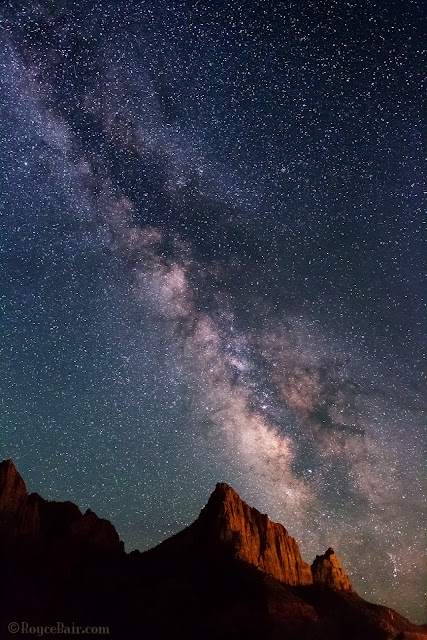
Milky Way over The Watchman - Zion National Park, Utah. Light on mountain is light pollution from nearby Springdale city street lights ~ © Royce Bair

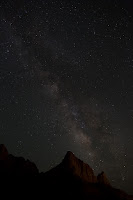
Simulated naked eye view
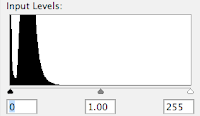
Histogram of a "naked eye" exposure
What the eye sees vs. what the camera sees. When people see my NightScapes for the first time the most common question is, "Is that what the Milky Way really looks like with your naked eye? Can you really see that many stars in the night sky?" The answer is, "Yes and no." You really can see it quite clearly with your naked eye (if you are in an area with very little light pollution), it's just not as bright as I can see with my camera.

The reason is because my camera is manually controlled to take the images at a longer exposure (typically 8 to 30 seconds, depending on the lens I'm using), so it gathers more light for its sensor than my eyes can. Also, the human eye has an iris aperture that is rated at about f/4.0, whereas my typical night photography lens is rated at f/2.8 or wider (letting in twice as much light to the sensor).
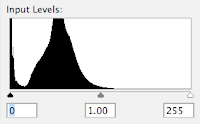
Histogram of raw camera exposure
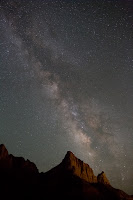
Raw camera exposure
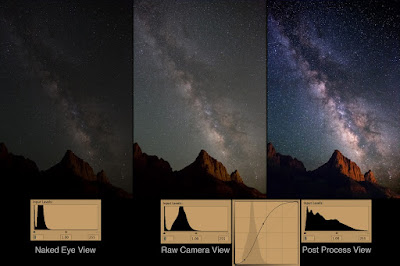
Above, is a simulated view of what my eye saw of the Milky Way over The Watchman in Zion National Park — this is about two stops darker than what my camera recorded (to the right), using an f/2.8 aperture setting, an exposure time of 15 seconds, and an ISO of 6400 or 8000. (Notice that the "toe" of the exposure histogram is just passing the midway point, whereas the toe of the simulated "naked eye" exposure histogram doesn't even come close to the midway point. This exposure is two stops less than what it should be —post production corrections can correct a 1-stop underexposure, but not a 2-stop underexposure. This means that if you only have an f/3.5 or f/4.0 lens; or your camera only goes to ISO 3200, you're still going to get an acceptable exposure, that's within the range of post production correction —provided you shoot in the camera "raw" mode, which typically has 16-bits of information, rather than the camera JPEG mode which carries only 8-bits of information per color channel. Here's a tutorial I created on the benefits of 16-bits raw images vs. 8-bits images.)

Post Production: The raw camera image has all the brightness and detail needed for a great photo, but it is flat or lacking in contrast. My final NightScape images are created in post production with very simple steps in Photoshop. All the stars are there in the camera's raw image, but a contrast gain in the sky is necessary to make them more apparent. My goal is give the same clarity you expect to see in an astronomical observatory (taken with a huge telescope) image, but with a wide-field view, coupled with an interesting landscape feature in the foreground — something the big telescopes cannot do!
After adding curve adj.
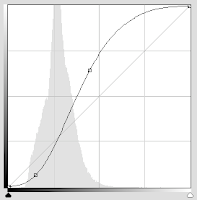
"S" shaped adjustment curve
The powerful "S" Curve. Here's the main Photoshop post production step I use to increase the contrast in the sky: I first select the sky, using the Magic Wand tool (I usually have to do a little Laso tool work to get all the bright stars into the selection). I then create a channel of the selection that I can use later. The second and main step is to turn that saved selection into a "Curves" Adjustment Layer that I can add a contrast-increasing "S" shaped adjustment curve. (The shape of this curve is controlled by the two anchor points so that the curve pinches or brightens the large highlight area to the right of the histogram "mountain", and darkens the shadow area to its left.) The more vertical the line becomes between the two anchor points, the more your contrast gain.
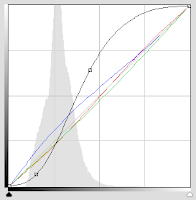
Slight color changes via Curves
Sky Color Balance. Every evening sky has a difference color to it, depending on the atmospheric conditions for that night. Some photographers shoot in the "AWB" Auto White Balance mode, which produces somewhat of a neutral coloration to the sky. Some will use a daylight White Balance (about 5250º K), giving a much warmer tone to the sky. Others will use the "Tungsten" (or incandescent) setting (about 3200º K) for a deep blue look. Although all of these settings can later be adjusted in Adobe Photoshop's RAW Converter, I prefer to set my Kelvin to 3800º. This setting usually give me the most natural look to my night sky.

Final, minor color changes can be made in Photoshop's Curves to the the red, green, and blue channels (represented by the three diagonal colored lines). Be careful to not over do this — as a little color goes a long way. The final coloration depends on what you remember seeing in the sky that night.

Adjusting the landscape. The final step is to use the same saved sky selection (channel) and inverse it so that it is now selecting the mountains, instead of the sky. Once this is done, another Adjustment Layer (you can use "Levels", or "Curves", but Curves is more powerful) is created from that selection in order to change the color of the sodium vapor lights (coming about a mile away from Springdale city) —so that The Watchman mountain is a more pleasing "red rock" sandstone color.
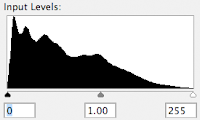
Histogram after all adjustments
Extended tonal range. The purpose of all these adjustments is to not only increase the contrast of the sky, but to extend the tonal range of the final image. Compare the histogram on the right to the histogram of the raw camera  exposure, above. Note: The "S" curve contrast adjustment naturally increases color saturation and vibrance. In most cases you will not have to artificially add more.

Compare: In the image below you can quickly compare the differences between the "naked eye" simulation, the "raw camera" exposure, the "S"-curve adjustment, and the final image —with the extended tonal range of its histogram.
Click to enlarge.
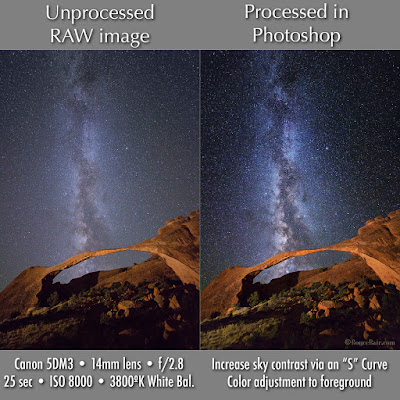
Here is another comparison of the camera RAW exposure vs. simple post processing via the "S" curve in a Photoshop "Curves" Adjustment Layer:
Click to enlarge
My eBook, Milky Way NightScapes, provides additional post processing instruction in its 4th chapter.


Thursday, June 5, 2014

Watchman under the Milky Way by Christopher Wray

"Watchman under the Milky Way" - Zion Canyon, Zion N.P. ~ © Christopher Wray (click to enlarge)
Christopher Wray, of Southern Colorado, created our Photo of the Day using a Canon 5D Mark III and a Rokinon 14mm f/2.8 Ultra Wide Angle lens. Chris combined two exposures, one of the sky for 30 seconds and another of the sandstone cliffs for 60 seconds. Both exposures were at ISO 4000, using an f/2.8 aperture. He did post processing in Photoshop to blend the two exposures.

"Our spiral galaxy’s bulge, of tightly packed central stars, is prominently visible [at certain times of the year] above The Watchman," says Chris. "Zion National Park is home to astonishing natural beauty by day. By night, the faint city lights of Springdale delicately illuminate the massive sandstone cliffs, while the Milky Way and surrounding heavens shimmer like exquisite jewels."

Challenges: "Unwanted stray light was the biggest challenge I faced while capturing this photo," reports Chris. "Despite the fact I was in a remote location, the occasional headlight of a passing car, headlamp from a fellow photographer or even blinking lights from a fixed wing aircraft was erroneously added to my exposure. It took a couple of takes to get a clean night sky, once I locked down the camera settings and composition."

Technique and tools: Chris is continually amazed at the ability of today’s DSLR camera sensor to capture latent hue, form and detail that reside in the dark sky. "By using basic Photoshop Curves controls and commonly available plug-in Nik Software, I was able to pull out the structure and color in the Milky Way without the need to introduce artificial color or saturation," say Chris. "I intentionally chose 3200º K as my white balance to create a cool midnight blue appearance."

Christopher Wray is a marketing communication consultant and avid digital photographer. He loves travel, landscape, portrait photography and most recently astrophotography. He is influenced by Ansel Adam’s guiding principle, “You don't take a photograph, you make it.” More of Chris’ work is viewable at his website and on 500px.

Royce's 2014 Workshop, Lecture & Video Conference Schedule: NightScapeEvents.com

Tuesday, September 11, 2012

Two Nightscape Lenses for the Price of One

The Watchman and the Milky Way, Zion National Park ~ © Royce Bair
The Canon EF 15mm f/2.8 Fisheye lens is one of my favorite night photography lenses because it allows me to include more than twice the sky as my 24mm lens (180º vs. 84º), and because it's really two lenses in one. Let me explain...

Although the heavy barrel distortion from this lens creates a special effect that is liked by many people, I can remove that distortion with software if I choose. The software-corrected image gives me a view somewhat similar to the Canon EF 14mm f/2.8L II USM Ultra-Wide Angle lens, which has a fairly undistorted 114º angle of view (but costs about three times as much as the Canon fisheye).

Here's an example of what I mean. Above, is a shot of The Watchman and the Milky Way, taken from the foothills west of Springdale, Utah at 2:00 in the morning (light pollution from the city is lighting The Watchman). This is the fisheye view without any distortion correction.

In the next image, I left the barrel distortion alone on the left side, but did a partial correction on the right side using Photoshop's "Edit > Transform > Warp" function:

Same image as above, with partial distortion correction on right side ~ © Royce Bair
Although a more complete distortion correction could have been accomplished with software, i.e. DxO Optics Pro, I've found this is not always as aesthetically pleasing as being more selective via Photoshop. I should point out that this lens has fairly acceptable coma at its wide-open aperture of F/2.8; it is about 65% corrected at F/3.5, and it is about 75% corrected at F/4.0.

Both of these photos were taken with the 15mm mounted to the Canon EOS 5D Mark III camera body, which produces amazingly low-noise at the high ISO of 6400 (exposure was 30 seconds @ f/3.5).

My favorite Prime Lens for Starry Night Skies: is the Samyang/Rokinon/Bower 24mm f/1.4 because it can be shot wide open, and it produces very little coma aberration (it also costs about one-third of the Canon and Nikon lenses with equivalent specs)!

Royce Bair is the editor of this blog and the photographer of the above images. Here is my gallery of NightScape images. My schedule of workshops, tutorials, and other events is available here.

Monday, September 10, 2012

Overcoming Coma in Starry Night Photography


A night photographer must learn how to control lens aberrations, like coma, in order to produce great photos of a star-filled sky that includes landscape features. (Click on above image for more information and a larger view.)

Those who are familiar with my recent style of NightScape work know that I'm photographing the stars as points of light, rather than as star trials. To do this, I must keep my exposures under 30 seconds, and often as short as eight seconds, depending on the focal length of the lens. In order to get the proper sky exposure, I must use high ISO's (typically above 6400), and large lens apertures, such as f/2.8 or wider.

The problem with shooting a lens wide open is that stars can really show off the faults or aberrations of a lens, especially coma. Comatic aberration causes point sources, such as stars, to appear distorted --appearing to have a tail (coma) like a comet. These coma "tails" are most apparent near the edges of a photo. The good news is that 50% of the distortion goes away when a well-designed lens is stopped down by one stop, and about 80% goes away by two stops. Unfortunately, with my night photography, I can't afford the light loss that comes with stopping down from f/2.8 to f/4.0 or f/5.6!

This is the reason I purchased the Canon EF 24mm f/1.4 L USM II Wide Angle Lens. This lens was used to photographed the above photo of the Milky Way over the Watchman, in Zion National Park. As you can (below) from my own tests on point sources of light, this lens is fairly well-corrected by f/2.8 (click on the image for a larger view):


You'll notice that by closing down two more stops, to f/5.6, does not produce as significant of an improvement! If I get in a pinch, and need more light, I can get acceptable results at f/2.0. But the real beauty of this lens is the bright image it gives you in the viewfinder. You can imagine that composing in near pitch black is made so much easier with this brilliant, f/1.4 lens!

I get similar results with my Canon EF 50mm f/1.4 USM Standard Lens. By stopping down to f/2.8, I've been able to make print enlargements up to 24x36 inches (and 30x40) with very pleasing results. Stopping down to f/2.0 reduces my print quality to about 18x24 inches (or 16x20). Shooting wide open (f/1.4) means I cannot enlarge my prints much beyond 8x10 or 11x14 inches (unless I don't want my name associated with them)!

Royce Bair is the editor of this blog and the photographer of the above images. Here is my gallery of NightScape images. My schedule of workshops, tutorials, and other events is available here

UPDATE - Inexpensive prime lenses with almost NO coma: Check out part II about the Samyang / Rokinon lenses. These lenses can be used wide open (at f/1.4), and have very little coma!